
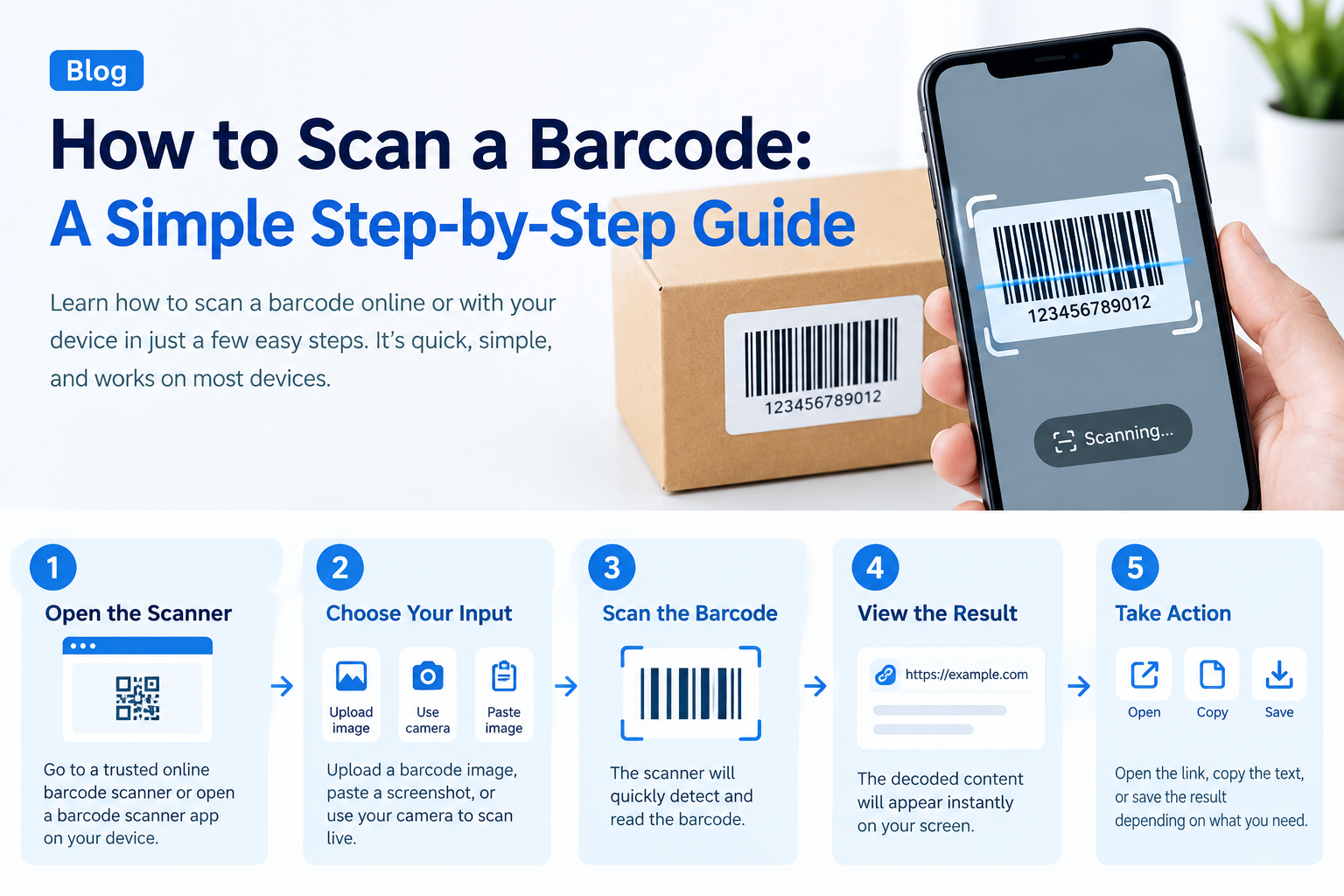
How do you scan a barcode? Open a scanner app or your phone's camera, hold the barcode steady about 15 to 30 cm (6 to 12 inches) away and wait for it to read. The app then shows the number or the product details. That is the short answer, and it works on most phones.
This guide shows you how to scan a barcode with an iPhone, an Android phone, a handheld barcode scanner and an online tool. You will also learn how to read the numbers under a barcode, how to tell which type of barcode you have, and what to do when a barcode will not scan.
Quick Answer: How to Scan a Barcode in 5 Steps
- Open a scanner. Use your camera, a barcode scanner app or an online barcode scanner.
- Point it at the barcode. Keep the whole barcode inside the frame.
- Hold steady. Stay about 15 to 30 cm (6 to 12 inches) away and avoid glare.
- Wait for the result. You will see a beep, a vibration or the number on the screen.
- Check the result. Compare the scanned number with the digits printed under the barcode.
More Quick Answers
| Question | Short answer |
|---|---|
| How do I scan barcodes? | Use a scanner app, Google Lens or a handheld scanner. Point it at the barcode and hold steady. |
| How to scan barcode labels on products? | Keep the whole label inside the frame and avoid glare on shiny packaging. |
| How to scan barcodes with your phone? | Open a scanner app or the Google app, tap the camera icon and point it at the code. |
| How to scan a bar code from a photo? | Upload the picture to an online scanner, or open it in Google Photos and tap Lens. |
| How to scan bar codes in bulk? | Use a handheld scanner and a spreadsheet. Click a cell, scan, and repeat. |
| How to read barcodes? | Read the digits printed under the bars, then check the prefix and the last digit. |
| How to read bar code numbers? | Start with the first digit or prefix, then the middle digits, then the check digit. |
| How to read bar codes on packaging? | The bars cannot be read by eye. Read the printed number or scan it. |
| How to use barcode scanner hardware? | Connect it, click where the number should go, aim and press the trigger. |
| How does a barcode scanner work? | It measures the light reflected from the bars and spaces and turns the pattern into digits. |
How to Scan a Barcode With Your Phone
If you are asking "how can I scan a barcode with my phone?", the steps are almost the same on every phone. You need a camera that can focus, enough light and a scanner that understands barcodes. Many people also search for how to use a barcode scanner on a phone, and the answer is the same: open the scanner, point, hold steady and read the result.
How to Scan a Barcode on iPhone
Can iPhone scan barcodes? Yes, but there is a difference. The built-in Camera app reads QR codes automatically. It does not read regular product barcodes the way it reads QR codes. To scan a barcode using iPhone, use one of these options:
- Use a scanner or shopping app. Many store, price-comparison and food-tracking apps have a barcode scanner built in. Open the app, tap the scan button and point the camera at the barcode.
- Use the Google app with Lens. Open the Google app, tap the camera icon, point it at the barcode and tap the result.
- Use an online barcode scanner in Safari. Barcode Scanner
These three options also answer common questions such as how do I scan a barcode on my iPhone, how to read a barcode with an iPhone and how to use a barcode scanner on iPhone.
What does "how to scan app barcode iphone" mean? It usually means one of two things. If you want to scan a product barcode with an app, use option 1 above. If you want to scan a barcode that is shown inside an app, such as a loyalty card or ticket, the cashier or gate scanner reads it from your screen. Turn the screen brightness up and keep the screen clean.
How to Scan a Barcode on Android
For how to read barcode in Android, open the Google app or Google Lens, tap the camera icon and point it at the barcode. Many Android phones also have a scan mode in the camera app. Shopping and inventory apps from the Play Store include scanners as well. The steps are the same: point, hold steady and wait for the result.
How to Scan a Barcode From a Picture
If you only have a photo or a screenshot, you can still scan it. For how to scan a barcode from a picture, upload the image to an online barcode scanner, or open the picture in Google Photos and tap Lens. Use a sharp, well-lit picture with the whole barcode visible. Barcode Scanner
Scan a Barcode Online (No App)
An online barcode scanner runs in your browser, so you do not need to install an app. Open the page, allow camera access, point the camera at the barcode and read the result. You can also use it on a computer with a webcam. Barcode Scanner
Tips for Scanning Barcodes With Your Phone
- Clean the camera lens.
- Use good, even light and avoid glare on shiny packaging.
- Hold the phone parallel to the barcode, not at a sharp angle.
- Move closer or further away until the camera focuses.
- Flatten curved or wrinkled labels.
How to Use a Barcode Scanner (USB or Bluetooth)
A handheld scanner is faster than a phone when you scan many items. Here is how to use a barcode scanner. The same steps apply to a barcode reader.
Steps to Use a Barcode Scanner
- Connect it. Plug a USB scanner into your computer. Most USB scanners act like a keyboard, so they need no driver. For a Bluetooth scanner, follow the pairing steps in its manual. Many models are paired by scanning a pairing barcode.
- Wait for the confirmation. Most scanners beep or light up when they are ready.
- Click where you want the number. Click into a spreadsheet cell, a point-of-sale field or a search box.
- Aim and press the trigger. Point the scanner at the barcode and press the trigger. For a laser scanner, make sure the red line crosses the whole barcode.
- Check the result. The scanner types the number and usually presses Enter for you.
If you want to test a new scanner, open a blank text document and scan any product barcode. The number should appear.
Laser and Imager Scanners
A laser scanner reads 1D barcodes such as UPC and EAN. An imager scanner takes a picture of the barcode, so it can read both 1D barcodes and 2D codes such as QR codes. If you need to scan QR codes, choose an imager.
Barcode Will Not Scan? 8 Fixes
- Low contrast: barcodes need dark bars on a light background.
- Damaged or dirty label: wipe it clean, or type the number by hand.
- Glare: tilt the item or change the light.
- Wrong distance: move closer or further away.
- Dirty lens or window: clean your camera or scanner.
- Barcode too small or printed badly: reprint it larger at a higher quality.
- Wrong scanner type: a 1D laser scanner cannot read a QR code.
- Wrong format settings: some scanners need a format turned on.
If the barcode is your own, make a fresh one with a free barcode generator and print a test. Barcode Generator
How to Read a Barcode
You cannot read the bars by eye, because they are a pattern of widths. But you can read the digits printed under the barcode. So how do you read a barcode? Read the number printed under the bars, then work out what the digits mean.
How to Read Barcode Numbers (UPC and EAN)
How to read a barcode number depends on the type. Here is how to read a UPC code, which has 12 digits:
- The first digit is the number system.
- The middle digits identify the company and the product. The split between the two can vary.
- The last digit is the check digit.
That is how to read a UPC code in short. A 13-digit EAN-13 barcode works in the same way but starts with a prefix that tells you which GS1 organisation issued the number.
What the First Digits of an EAN-13 Mean
| First digits | Issued by (GS1 member) |
|---|---|
| 000–139 | United States and Canada |
| 300–379 | France |
| 400–440 | Germany |
| 450–459, 490–499 | Japan |
| 500–509 | United Kingdom |
| 690–699 | China |
| 978, 979 | Books (ISBN) |
This prefix shows where the number was issued, not where the product was made. The table is a short list. GS1 publishes the full list of prefixes.
How to Decode Barcode Numbers and the Check Digit
To decode barcode numbers, split the number into its parts and check the last digit. For how to decode a barcode in a simple way, test the check digit for 400638133393:
- Add the digits in odd positions: 4 + 0 + 3 + 1 + 3 + 9 = 20.
- Add the digits in even positions and multiply by 3: (0 + 6 + 8 + 3 + 3 + 3) × 3 = 69.
- Add the two results: 20 + 69 = 89.
- The check digit is what brings the total to the next multiple of 10: 90 − 89 = 1.
The full number is 4006381333931. If the last digit does not match, the number was typed or scanned wrongly. This is also how to decipher a barcode when a scan looks suspicious.
How to Read a Barcode Manually
To read a barcode manually, read the printed digits, work out the system or prefix, and check the last digit as above. This does not mean reading the bars, because only a scanner or an app can decode them. Learn more about each format in our barcode generator guide. Barcode Generator
What Type of Barcode Is This?
If you are asking what type of barcode is this, or what barcode type is this, look at the number of digits and the shape.
| What you see | Likely type |
|---|---|
| 13 digits under the bars | EAN-13 |
| 12 digits under the bars | UPC-A |
| 8 digits under the bars | EAN-8 or UPC-E |
| Dense bars on a shipping label, letters and digits | Code 128 |
| Letters with an asterisk at each end | Code 39 |
| 14 digits, often with a thick frame on cartons | ITF-14 |
| Square pattern of dots | QR code (a 2D code, not a 1D barcode) |
If you are asking "what is this barcode?", scan it and read the result. If you are asking "what is this barcode number?", check the digits, the prefix and the check digit. You can see every format in our barcode generator. Barcode Generator
Expiry Date and Product Checks From a Barcode
How to Know the Expiry Date From a Barcode
How to know expiry date from barcode: in most cases you cannot. A standard UPC or EAN barcode identifies the product only. It does not contain the expiry date, the price or the batch. For how to check expiration date from barcode, look at the printed date on the package.
Some codes do carry dates. GS1-128 and GS1 DataMatrix codes use Application Identifiers, which are numbers in brackets that label each piece of data.
| Identifier | Meaning |
|---|---|
| (01) | Product number (GTIN) |
| (10) | Batch or lot number |
| (15) | Best before date |
| (17) | Expiry date (YYMMDD) |
How to Look Up a Barcode
To look up a barcode, scan it or type the full number, search it in a product database or a search engine, and compare the result with the packaging.
- To find the barcode of a product, look for it on the package or label.
- To find a product by UPC code, search the 12 digits in a product database.
- To check barcode details online, use a product database or a GS1 lookup tool, and compare the product name and brand.
How to Check an Original Product From the Barcode
How to check original product from barcode: a barcode alone cannot prove that a product is genuine, because counterfeit packaging can copy a real number. A lookup shows which company a number was issued to. GS1 offers lookup tools for this. Always compare the packaging quality, the seals, the batch code, the seller and the price too.
What Is a Barcode Scanner?
What is a barcode scanner? It is a device or an app that reads a barcode and turns it into a number or text that a computer can use. A barcode reader (or bar code reader) and a barcode scanner are the same thing. They can be handheld, fixed at a checkout, built into a phone or run in a web browser.
How Do Barcode Scanners Work?
How do barcode scanners work? A scanner lights up the barcode with a laser or an LED. The dark bars absorb the light and the white spaces reflect it. A sensor measures the reflected light and turns it into an electrical signal. Software then reads the widths of the bars and spaces, converts them into digits and checks the check digit. Then it sends the number to your computer, till or app.
Imager scanners and phone cameras work a little differently. They take a picture of the barcode and decode it with software.
Can Barcode Scanners Read QR Codes?
Can barcode scanners read QR codes? A 1D laser scanner cannot, because a QR code is a 2D code. An imager scanner or a phone camera can read both.
A QR barcode scanner is a scanner or an app that reads both barcodes and QR codes. To use one, open the app, point the camera at the code and tap the result. To scan a QR code on a computer, use a webcam with an online scanner. QR Code Scanner
Frequently Asked Questions
1. How do I scan a barcode with my phone?
Open a scanner app, the Google app with Lens or an online barcode scanner. Point the camera at the barcode, hold it steady about 15 to 30 cm (6 to 12 inches) away and wait for the result.
2. Can an iPhone scan barcodes?
Yes, with an app. The iPhone Camera app reads QR codes, but for product barcodes use a scanner or shopping app, the Google app with Lens, or an online scanner in Safari.
3. How do I scan a barcode on Android?
Open the Google app or Google Lens, tap the camera icon and point it at the barcode. Many Android phones also have a scan mode in the camera, and many apps have a built-in scanner.
4. How do I scan a barcode from a picture?
Upload the picture to an online barcode scanner, or open it in Google Photos and tap Lens. Use a sharp, well-lit picture that shows the whole barcode.
5. How do I use a handheld barcode scanner?
Plug in a USB scanner or pair a Bluetooth one, click where you want the number, aim at the barcode and press the trigger. The scanner types the number and usually presses Enter.
6. Why won't my barcode scan?
The usual causes are low contrast, glare, a damaged or tiny barcode, the wrong distance, a dirty lens or the wrong scanner type. Clean the label and the lens, adjust the light and try again.
7. How do I read a barcode number?
Read the digits printed under the bars. In a UPC the first digit is the number system and the last digit is the check digit. In an EAN-13 the first digits show which GS1 organisation issued the number.
8. Can I find the expiry date from a barcode?
Usually not. A standard barcode identifies the product only. The expiry date is printed on the package, or stored in a GS1-128 or GS1 DataMatrix code.
9. How can I check if a product is original from its barcode?
A barcode lookup shows which company a number was issued to, but it cannot prove the product is genuine. Also compare packaging, seals, batch numbers, the seller and the price.
10. Can barcode scanners read QR codes?
A 1D laser scanner cannot read QR codes. An imager scanner or a phone camera can read both barcodes and QR codes.
Related Guides and Tools
Need to Make Your Own Barcode?
If you sell products, track stock or label files, you can create barcodes for free in Code 128, EAN-13, UPC-A and more.
CTA button text: Open the Barcode Scanner