
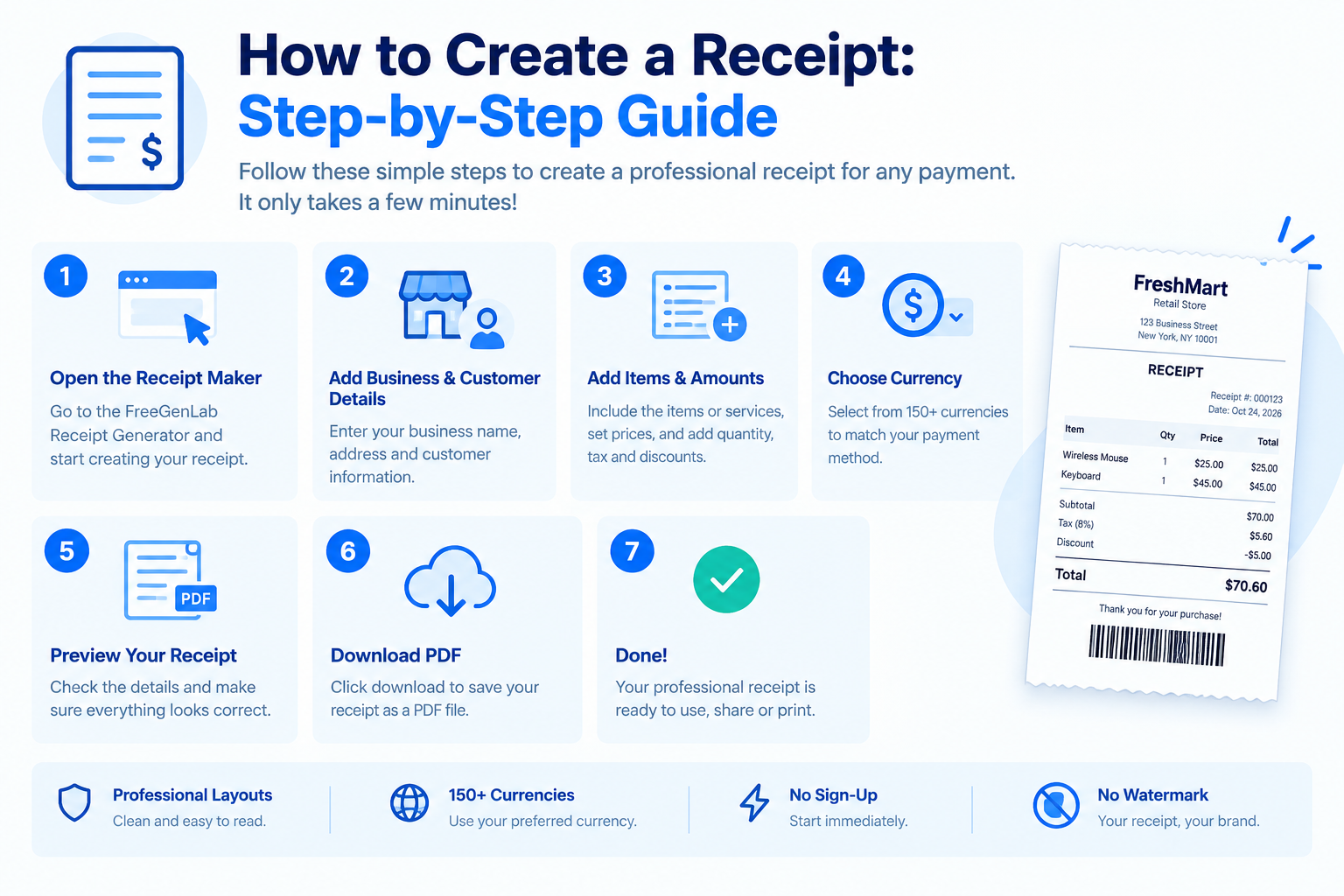
How to Create a Receipt
You create a receipt by writing the word "Receipt", a unique receipt number, the date, your business details, the customer's name, what was paid for, the amount received, and the payment method. Use a free online tool and you can download a finished PDF in about a minute.
This guide shows exactly how to create a receipt, what it must include, and how to make one for free with the FreeGenLab Receipt Generator. It works for freelancers, shop owners, landlords, and small businesses, with no sign-up.
Quick Answer: How to Make a Receipt
- Add the word "Receipt" and a unique receipt number.
- Add the date of payment.
- Add your business name, address, and contact details.
- Add the customer's name.
- List what the customer paid for, with quantity and price.
- Show the total, the amount paid, and the payment method.
- Save it as a PDF and give or send it to the customer.
Create a Receipt Online for Free
The free FreeGenLab Receipt Generator makes a clean receipt right in your browser:
- Open the receipt generator.
- Enter your business details and the customer's details.
- Add the items or services, with quantity and price. Totals calculate automatically.
- Add tax, discount, payment method, and a short note.
- Choose your currency and download the PDF.
Why people use it:
- 100% free, with no sign-up needed.
- Multi-currency support for local and international customers.
- Private. Your data stays in your browser.
- Works on mobile, tablet, and desktop.
- Instant PDF that is ready to email, share on WhatsApp, or print.
What Is a Receipt?
A receipt is a document that proves a payment was made. It shows who paid, who received the money, how much was paid, when, and for what. The seller gives it to the buyer after the payment arrives.
A receipt protects both sides. The customer can prove they paid, and the seller has a clean record for accounting and tax.
Receipt vs. Invoice: What Is the Difference?
People often mix these up. The difference is timing and purpose.
| Feature | Invoice | Receipt |
|---|---|---|
| Purpose | Asks for payment | Confirms payment was received |
| When you send it | Before payment | After payment |
| Shows due date | Yes | No |
| Shows payment method | Optional | Yes |
| Balance due | Usually shows an amount owed | Usually shows zero |
The normal order is simple: send a quote or estimate, then an invoice, then a receipt once the money arrives. If you need to prepare an invoice, use the FreeGenLab Invoice Generator.
What to Include in a Receipt
A professional receipt should contain the following details:
- The word "Receipt" at the top.
- Receipt number: Unique and in order, like REC-0001.
- Date of payment: The date the money was received.
- Your business details: Name, address, phone, email, and logo.
- Customer details: Name or company.
- Description: The goods or services paid for.
- Item details: Quantity, price, and line total for each item.
- Subtotal, tax, and discount: Each shown on its own line.
- Total amount paid: The amount received from the customer.
- Payment method: Cash, bank transfer, card, JazzCash, Easypaisa, or PayPal.
- Payment reference: An invoice number or transaction ID, if available.
- Tax numbers: Such as NTN or STRN where applicable.
- Closing note: A signature or a short "Thank you" message.
How to Create a Receipt Step by Step
Step 1: Pick a Clean Receipt Format
Keep the layout simple: your details at the top, the customer's details below, an itemized list in the middle, and the total paid at the bottom. A ready-made receipt template saves you from designing this yourself.
Step 2: Add Your Business Information
Enter your business name, address, phone, email, and logo. This shows who received the money and builds trust.
Step 3: Add a Receipt Number and Date
Give every receipt its own number so you can find it later. Simple formats work well: REC-0001, REC-0002, or a year-based format like 2026-001. Add the date the payment was received, not the date you made the sale.
Step 4: Add the Customer's Details
Write the customer's full name or company name. For larger payments, add their address or phone number as well.
Step 5: List What Was Paid For
Add one line per item or service with a short description, quantity, and price. Be specific. "Website design, 5 pages" is better than "Design work." If the payment is for an invoice, add the invoice number as a reference.
Step 6: Add Tax, Discount, and the Total Paid
Show tax as its own line and include any discount. Then show the total amount received. If the customer paid only part of the bill, write "Partial payment" and show the remaining balance.
Step 7: Add the Payment Method, Review, and Send
Write how the customer paid, such as cash, bank transfer, or Easypaisa. Check the names, numbers, and totals. Download the receipt as a PDF and send it to the customer. Keep a copy for your records.
Receipt Template and Example
If you want a receipt template you can reuse, copy this layout. Each new receipt only needs a new number, date, and items.
RECEIPT
Receipt No: REC-0001
Date: 28 Oct 2026
From: Your Business Name, address, phone, email
Received from: Customer Name
| Description | Qty | Rate | Amount |
|---|---|---|---|
| Logo design | 1 | 15,000 | 15,000 |
| Social media banners | 5 | 2,000 | 10,000 |
Subtotal: 25,000
Discount (10%): -2,500
Total paid: 22,500
Payment method: Bank transfer
Reference: Invoice INV-0001
Note: Thank you for your business.
You can build a similar layout with the free receipt generator.
Types of Receipts
The same steps work for every kind of receipt. Only the description changes.
- Payment receipt: Confirms a payment received for goods or services.
- Cash receipt: Confirms a payment made in cash. Add a signature line for extra proof.
- Sales receipt: Given at the time of sale in a shop.
- Rent receipt: Confirms rent paid for a month, with the property address and period.
- Donation receipt: Confirms a gift to a charity or organization.
- Advance or deposit receipt: Confirms an upfront payment, with the remaining balance noted.
How to Create a Receipt for Payment Received
If a customer has just paid you, follow this short version:
- Open the receipt generator.
- Enter the customer's name and what they paid for.
- Enter the amount received and the payment method.
- Add the date and your business details.
- Download the PDF and send it right away.
Send the receipt the same day. It avoids disputes and makes your customer feel looked after.
How to Create a Receipt in Word, Excel, or Google Docs
You can make a receipt in any document app, but it takes longer and the totals are manual.
| Method | How it works | Main drawback |
|---|---|---|
| Free online generator | Fill a form and download a PDF | Fewer accounting features |
| Word | Use a template and edit text and totals by hand | Layout shifts and manual calculations |
| Excel | Use formulas for line totals and tax | Setup time and formula errors |
| Google Docs | Use a template and export as PDF | Totals are manual |
| Paper receipt book | Write by hand and tear off a copy | Easy to lose and hard to search |
If you only want a quick, clean receipt, an online generator is the fastest path.
Common Receipt Mistakes to Avoid
- Missing or duplicate receipt numbers. They cause confusion and bookkeeping problems.
- No date. A receipt without a date is weak proof.
- Vague descriptions. Unclear line items lead to questions later.
- No payment method. Always say how the money was received.
- Wrong totals or tax. Use a generator that calculates for you, and review the final figures.
- Issuing a receipt before the money arrives. Send an invoice first. A receipt is for money already received.
- Not keeping a copy. Save every receipt for your records.
Important: Use Receipts for Real Payments Only
Only create a receipt for a payment that actually happened. Making a fake receipt to mislead a company, a tax office, or a customer is dishonest and can be illegal. Tax and record-keeping rules differ by country and change over time, so check the current requirements with your local tax authority or a tax professional.
Tips for Better Receipts
- Send the receipt as soon as the payment arrives.
- Add your logo and a clean layout so it looks professional.
- Use one numbering system and never reuse a number.
- Add the invoice number as a reference, so both documents match.
- Save receipts as PDFs with clear names, like Receipt-0001-ClientName.pdf.
- Keep digital and backup copies for tax time.
Related Free Tools and Guides
Frequently Asked Questions
How do I create a receipt for free?
Use a free online tool like the FreeGenLab Receipt Generator. Enter your business and customer details, add items and the payment method, and download the PDF. No sign-up is needed.
What should a receipt include?
A receipt number, date, seller and buyer details, a list of items with prices, tax, the total paid, and the payment method.
What is the difference between a receipt and an invoice?
An invoice asks for payment. A receipt confirms that payment was received.
How do I make a receipt for a payment received?
Enter the customer's name, what they paid for, the amount, the date, and the payment method. Then download the PDF and send it.
Can I create a receipt in Word or Excel?
Yes, you can use a template. But you must format it and check the totals yourself. An online generator is faster and can reduce manual calculation errors.
How do I make a cash receipt?
Create a receipt with "Cash" as the payment method, and add a signature line for both sides if you want extra proof.
Do I need a receipt number?
Yes. A unique number helps you find the receipt later and keeps your records in order.
Can I add my logo to a receipt?
Yes, if your receipt tool supports logo uploads. A logo makes the receipt look professional and helps customers recognize your brand.
Is a receipt a legal document?
A receipt is proof of payment and a record of the sale. Rules for tax and record-keeping differ by country, so check your local requirements.
Is it safe to create a receipt online?
That depends on how the tool handles your information. If the tool processes receipt data in your browser without uploading it to a server, your details can remain on your device. Check the tool's actual privacy practices before entering sensitive information.
How do I create a receipt PDF?
Fill in the online receipt generator, review the totals, and click download. If PDF export is supported, the file saves as a PDF you can email or print.
Can I make a receipt for a partial payment?
Yes. Show the amount paid, mark it as a partial payment, and add the remaining balance.
Conclusion
To create a receipt, add your details, the customer's details, a unique receipt number, the date, what was paid for, the total, and the payment method. Save it as a PDF and send it as soon as the money arrives. Skip the manual work and create your receipt free in under a minute.