
Purchase Order Template
A purchase order (PO) is a document a buyer sends to a seller to order goods or services. It lists what you want, the quantity, the agreed price, and the delivery terms. With a free purchase order template, you can fill in your details and download a finished PDF in about two minutes.
This guide shows how to create a purchase order, what it must include, and how to make one with the FreeGenLab Purchase Order Template. It works for small businesses, shops, freelancers, and teams that buy from suppliers. No sign-up is needed.
Create a Purchase Order Online for Free
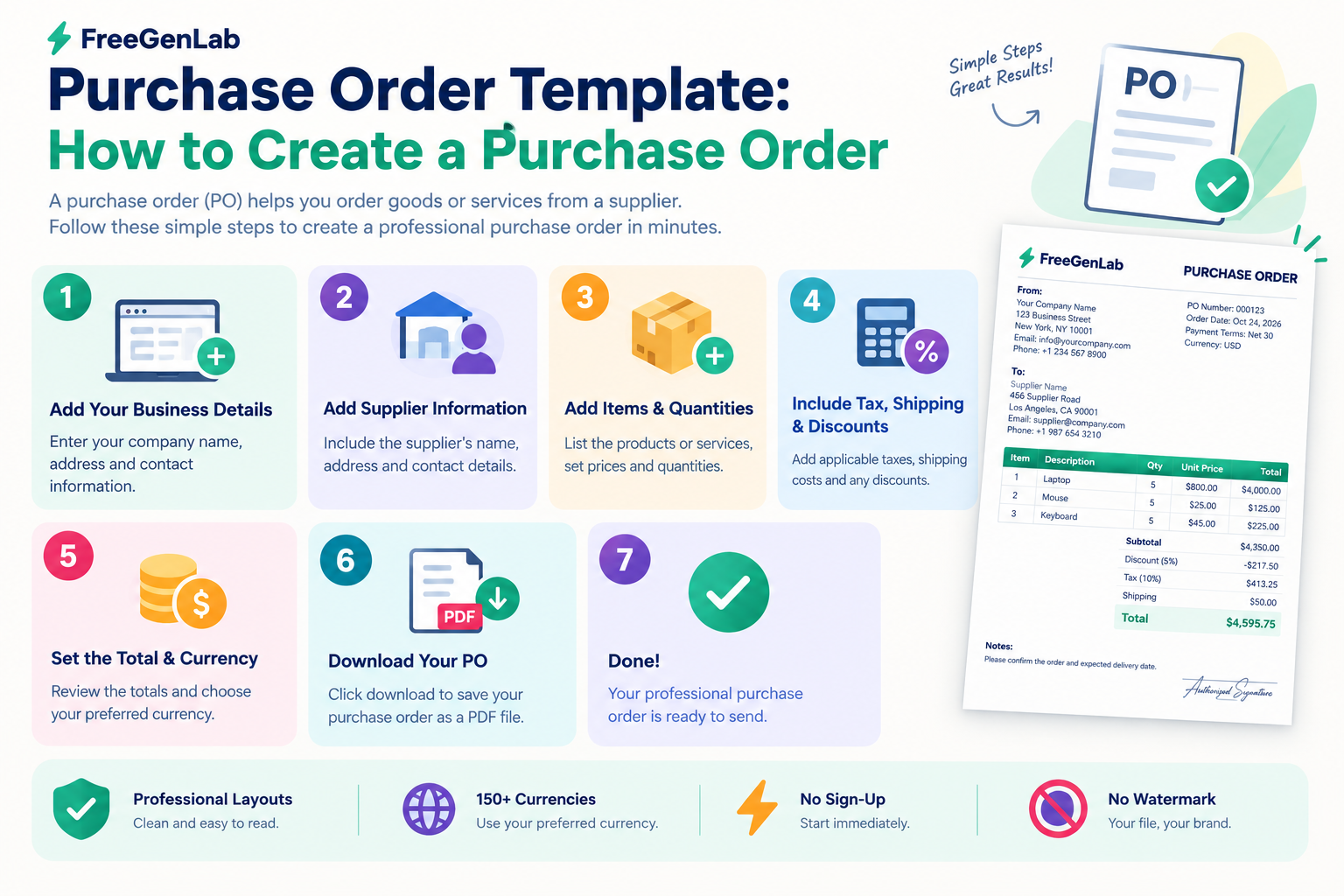
Use the FreeGenLab Purchase Order Template to build a clean PO right in your browser:
- Open the purchase order template.
- Enter your company details and the vendor's details.
- Add a PO number and the order date.
- Add each item with a description, quantity, and unit price. Totals calculate automatically.
- Add tax, shipping, delivery date, and payment terms.
- Choose your currency and download the PDF.
Why people use it:
- 100% free, with no sign-up needed.
- Multi-currency support for local and international suppliers.
- Private. Your data stays in your browser.
- Works on mobile, tablet, and desktop.
- Instant PDF that is ready to email or print.
Create Your Free Purchase Order Now
Quick Answer: How to Create a Purchase Order
- Write "Purchase Order" and a unique PO number at the top.
- Add the order date.
- Add your company details as the buyer.
- Add the vendor's name and address as the seller.
- List each item with a description, quantity, and unit price.
- Add tax, shipping, and the total.
- Add the delivery date, delivery address, and payment terms.
- Save it as a PDF and send it to the vendor.
What Is a Purchase Order?
A purchase order is a commercial document issued by a buyer to a seller. When the seller accepts it, it becomes a record of what was ordered, at what price, and under which terms. It helps both sides avoid misunderstandings about quantity, price, and delivery.
The buyer creates the PO. The seller then delivers the goods or services and sends an invoice that matches it.
Why Use a Purchase Order?
- Clear agreement. Both sides know exactly what was ordered and at what price.
- Budget control. You approve spending before it happens.
- Fewer mistakes. Quantity, price, and delivery details are written down.
- Easy tracking. You can match POs against deliveries and invoices.
- Better records. POs support your accounting and audits.
Purchase Order vs. Invoice vs. Quote
These documents are often mixed up. Each one has a different job and a different sender.
| Document | Who Sends It | Purpose | When |
|---|---|---|---|
| Quote | Seller | Offers a price | Before the order |
| Purchase order | Buyer | Places the order | After accepting the quote |
| Invoice | Seller | Asks for payment | After delivery |
| Receipt | Seller | Confirms payment | After payment |
A typical flow is: the seller sends a quote, the buyer sends a purchase order, the seller delivers and sends an invoice, and the buyer pays and receives a receipt. FreeGenLab has a tool for each step:
What to Include in a Purchase Order
A professional purchase order should contain the following details:
- The words "Purchase Order" at the top.
- PO number: Unique and in order, like PO-0001.
- Order date and required delivery date.
- Buyer details: Company name, address, phone, email, and logo.
- Vendor details: Company name, address, and contact person.
- Ship-to address: If it differs from the buyer's address.
- Item details: Description, SKU or product code, quantity, and unit price for each item.
- Totals: Line totals, subtotal, tax, shipping, and total amount.
- Payment terms: Such as Net 15, Net 30, or advance payment.
- Delivery terms and shipping method.
- Tax numbers: Such as NTN or STRN where applicable.
- Notes or special instructions: Such as packaging or quality requirements.
- Authorized signature or approval name.
How to Create a Purchase Order Step by Step
Step 1: Pick a Clean Purchase Order Format
Keep the layout simple: buyer and vendor details at the top, an itemized table in the middle, and the totals and terms at the bottom. A ready-made purchase order template saves you from designing it yourself.
Step 2: Add a PO Number and Dates
Use one numbering system and never repeat a number. Simple formats work well: PO-0001, PO-0002, or a year-based format like PO-2026-001. Add the order date and the date you need the goods.
Step 3: Add Buyer and Vendor Details
Enter your company name, address, and contact details. Then add the vendor's full name, address, and contact person. Incorrect details can cause delivery and payment delays.
Step 4: List the Items or Services
Add one line per item with a short description, product code, quantity, and unit price. Be specific. "A4 copy paper, 80 gsm, 500 sheets" is better than "Paper." For services, show the scope, hours, or fixed fee.
Step 5: Add Tax, Shipping, and the Total
Show tax and shipping on their own lines. Then show the grand total. A generator with automatic calculations can help reduce arithmetic errors.
Step 6: Add Delivery and Payment Terms
State where and when the goods should arrive, and how and when you will pay. Common payment terms are Due on Receipt, Net 7, Net 15, Net 30, or an advance payment.
Step 7: Review, Approve, and Send
Check names, numbers, and totals. Get internal approval if your company requires it. Download the PO as a PDF and email it to the vendor. Ask the vendor to confirm the order, and keep a copy for your records.
How to Create a Purchase Order Number
A PO number is a unique ID for every purchase order. It helps you match the PO to a delivery and an invoice later. Pick one pattern and stay with it.
| Format | Example | Best For |
|---|---|---|
| Simple sequence | PO-0001, PO-0002 | Small businesses and shops |
| Year + sequence | PO-2026-001 | Businesses that reset numbering each year |
| Department + sequence | OPS-001 | Companies with several departments |
| Vendor + sequence | ACME-001 | Teams that order often from the same supplier |
Three rules keep numbering clean: never reuse a number, never skip numbers without a reason, and never edit a PO after sending it. If something changes, issue a revised PO or a change order that refers to the original number.
Purchase Order Template and Example
If you want a purchase order template you can reuse, copy this layout. Each new order only needs a new number, vendor, and items.
PURCHASE ORDER
PO No: PO-0001
Date: 28 Oct 2026
Delivery by: 05 Nov 2026
Buyer: Your Company Name, address, phone, email
Vendor: Vendor Name, address, contact person
Ship to: Delivery address
| Description | Qty | Unit Price | Amount |
|---|---|---|---|
| A4 copy paper, 80 gsm (box) | 10 | 4,500 | 45,000 |
| Printer ink cartridge | 4 | 6,000 | 24,000 |
| Subtotal | 69,000 | ||
| Shipping | 1,000 | ||
| Total | 70,000 | ||
Payment terms: Net 15
Notes: Please confirm this order by email and quote this PO number on your invoice.
Authorized by: Name and signature
You can create a similar document with the free purchase order generator.
Purchase Order Process: From Order to Payment
A simple PO process looks like this:
- Request. A team member says what they need.
- Approve. A manager approves the request and budget.
- Create the PO. The buyer makes the PO and sends it to the vendor.
- Vendor confirms. The vendor accepts the order.
- Receive the goods. The buyer checks the delivery against the PO.
- Match the invoice. The buyer compares the invoice with the PO and the delivery.
- Pay. The buyer pays and receives a receipt.
Matching the PO, the delivery, and the invoice before payment is a simple way to catch wrong prices, wrong quantities, and duplicate bills.
How to Create a Purchase Order in Word, Excel, or Google Docs
You can make a PO in any document app, but it takes longer and the totals may need to be calculated manually.
| Method | How It Works | Main Drawback |
|---|---|---|
| Free online generator | Fill a form and download a PDF | Fewer accounting features |
| Word | Use a template and edit text and totals by hand | Manual math and layout shifts |
| Excel | Use formulas for line totals and tax | Setup time and formula errors |
| Google Docs | Use a template and export as PDF | Totals are manual |
| Procurement software | Create, approve, and track POs in one system | May require a paid subscription |
For occasional orders, an online generator can be a convenient option. Use procurement or accounting software when you need approval workflows, budgets, and reports.
Common Purchase Order Mistakes to Avoid
- Missing or duplicate PO numbers. They cause confusion and matching problems.
- Vague descriptions. Unclear items can lead to incorrect deliveries.
- No delivery date. The vendor does not know when you need the goods.
- No agreed price. Always write the unit price and the total.
- Missing payment terms. Buyers and vendors should not have to guess.
- Wrong vendor details. This can send the order to the wrong place.
- Changing a PO without telling the vendor. Issue a revised PO instead and confirm the change in writing.
Tips for Better Purchase Orders
- Send the PO before the vendor starts work or ships anything.
- Ask the vendor to put your PO number on every invoice and delivery note.
- Keep a master list of all POs with their status: open, delivered, or paid.
- Use the same template every time so vendors know what to expect.
- Add your logo and a clean layout so the PO looks professional.
- Save PDFs with clear names, like PO-0001-VendorName.pdf.
Related Free Tools and Guides
- How to Scan a Barcode
- How to Create a Receipt
- How to Create Invoices
- How to Make a QR Code
- How to Make a Barcode
Frequently Asked Questions
What is a purchase order?
A purchase order is a document a buyer sends to a seller to order goods or services. It lists the items, quantities, prices, and delivery terms.
How do I create a purchase order for free?
Use a free online tool like the FreeGenLab Purchase Order Template. Enter your details, the vendor's details, and the items, then download the PDF. No sign-up is needed.
What should a purchase order include?
A PO number, order date, buyer and vendor details, an itemized list with quantity and price, tax, shipping, the total, delivery details, and payment terms.
What is the difference between a purchase order and an invoice?
A buyer sends a purchase order to place an order. A seller sends an invoice to ask for payment, commonly after delivering the goods or services.
What is the difference between a purchase order and a quote?
A seller sends a quote to offer a price. A buyer sends a purchase order to place the order based on the agreed terms.
Who creates a purchase order, the buyer or the seller?
The buyer creates the purchase order and sends it to the seller.
How do I create a PO number?
Use a simple sequence such as PO-0001, or add the year, such as PO-2026-001. Never reuse a number, and keep your numbering records consistent.
Is a purchase order legally binding?
A purchase order may form part of a legally binding agreement, depending on its terms, acceptance, and applicable law. Requirements differ by country, so check your local rules or consult a legal professional when necessary.
Can I create a purchase order in Word or Excel?
Yes. You can use a template, but you must format it and check the totals yourself. An online generator may be faster for simple orders.
Do small businesses need purchase orders?
They are not always required, but they help businesses that buy from suppliers. They can prevent mistakes and keep clear records.
Can I add my logo to a purchase order?
If your purchase order tool supports logo uploads, you can add your logo to make the PO look professional and help vendors recognize your company.
Is it safe to create a purchase order online?
Safety depends on how the tool handles your information. Before entering sensitive business details, check the tool's privacy policy and whether the information is uploaded to a server.
How do I change a purchase order after sending it?
Issue a revised PO or a change order that refers to the original PO number, and ask the vendor to confirm the change in writing.
Conclusion
To create a purchase order, add a unique PO number, your details, the vendor's details, itemized goods with prices, tax, shipping, the total, and clear delivery and payment terms. Save it as a PDF and send it before the vendor ships. Skip the manual work and create your purchase order free in under two minutes.